Unlock a Subscriber Account
To unlock a subscriber account
-
Log in to WebEOC Fusion.
-
In the Administration tab of the Admin window, click the Subscribers subtab.
-
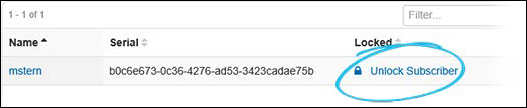
On the Subscribers page, click Unlock Subscriber next to the name of the subscriber account you want to unlock.
-
When the confirmation window opens, click OK to unlock the account.
Alternatively, click the name of the user from the Subscribers List and, on the Subscribers: Edit Subscriber page, clear the Locked checkbox and then click Save.
- After unlocking a subscriber account, you must contact the subscriber and instruct them to re-enable their PullService.
Related Concepts
Reference Materials
Related Tasks
Edit an Existing Administrator Account