Send a Notification
To send a notification, its notification template must be submitted and cannot be in draft status. The options for sending a notification are:
-
Send Now: Sends the notification to the target recipients immediately. The notification appears in the Active tab after it is sent.
-
Schedule: Sends the notification to the target recipients at a specified date/time. The notification appears in the Scheduled tab after the schedule is confirmed.
-
Next Scheduled Date: Sends the notification to the target recipients on a specified recurring basis. The notification appears in the Next Scheduled Date tab after the recurring schedule is confirmed.
To send notifications, follow the instructions by expanding the headings below.
 Send Now
-
On the main menu, click
 Notification Management. The Notifications page opens.
 -
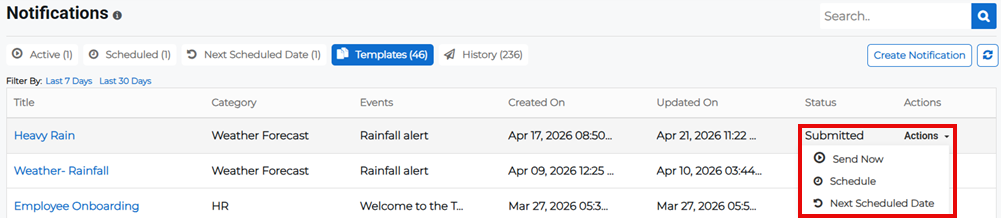
Click the Templates tab, then click the Actions button for the appropriate notification template and select Send Now from the menu. The notification template details page opens.
-
Scroll down to the Release pane to enter the Timezone associated with the notification.
-
Click Launch Now. The notification template is launched immediately, and the notification appears on the Active tab.
Schedule
Scheduling notifications gives you the flexibility to send notifications or alerts automatically at a predefined date and time. This also allows you to prioritize notifications or alerts by scheduling them at different intervals.
-
On the main menu, click
Notification Management. The Notifications page opens. -
Click the Templates tab, then click the Actions button for the appropriate notification template and select Schedule from the menu. The notification template details page opens.
-
Scroll down to the Release pane to enter the scheduled notification details:
-
Timezone: Specify the timezone that controls the date and time of the notification.
-
Date: Set the date when the notification will be sent.
-
Time: Set the time when the notification will be sent.
-
-
Click Schedule Now. The notification appears on the Scheduled tab.
Next Scheduled Date
-
On the main menu, click
Notification Management. The Notifications page opens. -
Click the Templates tab, then click the Actions button for the appropriate notification template and select Next Scheduled Date from the menu. The notification template details page opens.
-
Scroll down to the Release pane to enter the recurring notification details:
-
Timezone: Specify the timezone that controls the date and time of the notification.
-
Date: Set the date when the first notification will be sent.
-
Time: Set the time when the notification will be sent.
-
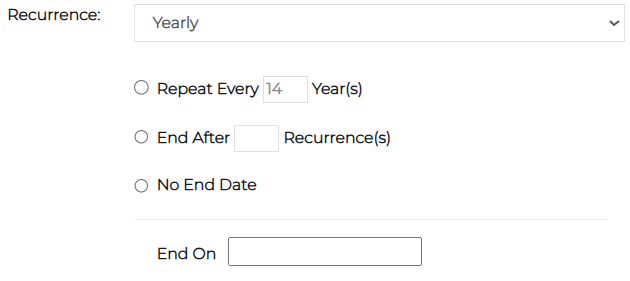
Recurrence: Specify whether the recurrence of the notification is on a Daily, Weekly, Monthly, or Yearly basis.
-
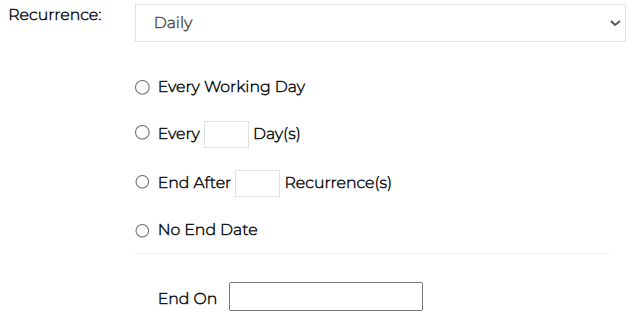
If the notification recurs daily, specify whether it is sent every working day (business day), every specified number of days, if it ends after a specified number of recurrences, has no end date, or ends on a specific date.
-
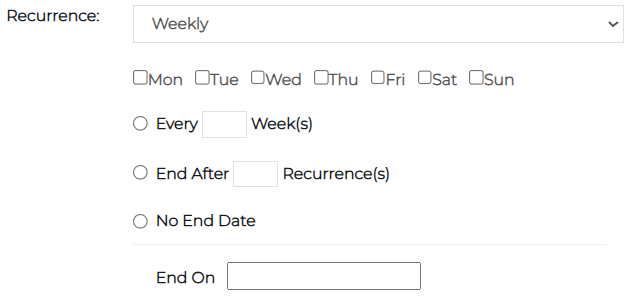
If the notification recurs weekly, specify whether it is sent on specific days of the week, every specified number of weeks, if it ends after a specified number of recurrences, has no end date, or ends on a specific date.
-
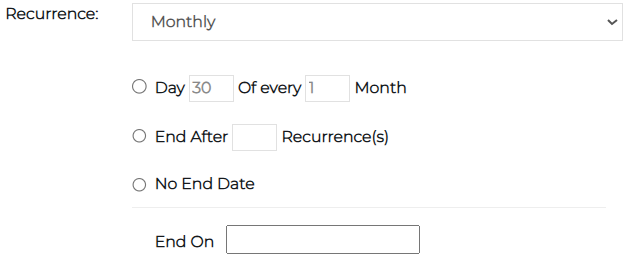
If the notification recurs monthly, specify what day of the month it is sent, whether it ends after a specified number of recurrences, has no end date, or ends on a specific date.
-
If the notification recurs yearly, specify the number of years it is sent, whether it ends after a specified number of recurrences, has no end date, or ends on a specific date.
-
-
-
Click Recur. The notification appears on the Next Scheduled Date tab.