Manage Scenarios
The list of scenarios can be refreshed using the refresh  button in the upper right.
To manage scenarios, follow the instructions by expanding the headings below.
 View scenario details
-
On the main menu, click
 Incident Management. TheIncidentspage opens.
 -
Click theScenariostab then click the scenario name link. The scenario details page opens. You can view:
-
Incident Template Details: The scenario name, description, when the scenario was created, who created it, and when the scenario was last updated.

-
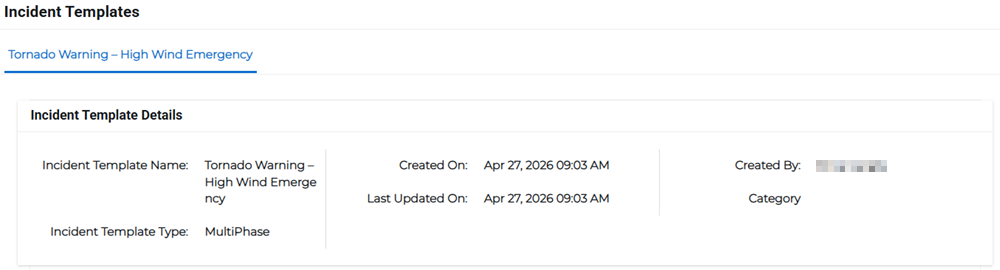
Incident Templates: The incident template name, type, category, when it was created, who created it, and when it was last updated. This information is given for all incidents added to the scenario.
-
Broadcast Settings: The sender email address, delivery order and method, broadcast duration, number of contact cycles, interval between delivery methods, and the preferred language.
-
Form Fields: The list of form fields added for the incident.
-
Phases: The phases included in the templates, including the message preview and target recipients for each phase.
-
Access Settings: The access settings set up for each of the templates used.
-
Edit a scenario
-
On the main menu, click (missing snippet link). TheIncidentspage opens.
-
Click theScenariostab, then click the scenario name link. The scenario details page opens.
-
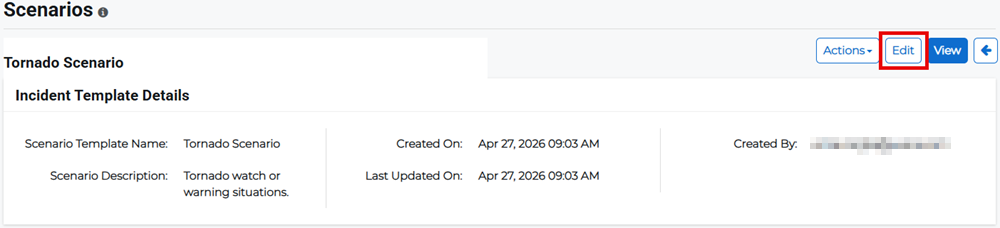
Click Edit.
-
Edit the appropriate scenario details then click Submit.
Copy a scenario
-
On the main menu, click (missing snippet link). TheIncidentspage opens.
-
Click theScenariostab, then click the scenario name link. The scenario details page opens.
-
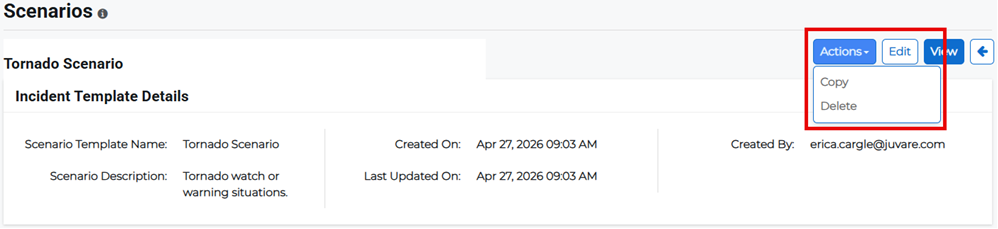
Click Actions then select Copy from the menu. The New Scenario Template page opens.
-
Enter a new scenario title and description, and add any other incident templates you want to include in the copied scenario.
-
Click Save if you want to save a draft scenario to edit later or Submit to finish.
Delete a scenario
-
On the main menu, click (missing snippet link). TheIncidentspage opens.
-
Click theScenariostab, then click the scenario name link. The scenario details page opens.
-
Click Actions then select Delete from the menu.
-
Confirm the deletion.