CORES RMS 6.7 Release Notes
These notes describe updates in the CORES RMS 6.7 release, scheduled for December 03, 2025. More information is available through the help in your solution or by contacting The internal and external people that participate in, might be affected by, or need to be notified about an incident. the Juvare Support Center at +1 (877) 771-0911 or support@juvare.com.
Browser compatibility
-
Latest Microsoft Edge Version
-
Latest Google Chrome Version
New Features
Badge Review
Badge A printable ID that displays user information, such as name, occupation, and credentials. review notifications An alert, update, advisory, information, drill, or test message that can be sent & received through delivery methods such as email, voice, text, fax, or inbox. are now shown on the Badges page. If specific profile A collection of information that identifies and defines you in the solution. Your profile differs from your account, which is how you log in. information for an account Used to track and manage users. Accounts differ from your profile, which is used to modify personal settings for using the solution. has been edited, as configured by your administrator, it triggers a badge review notification for all badges associated with that account. This allows admins to determine if a badge needs to be reissued.
Clicking the notification opens the Account Update Review dialog, which allows you to quickly manage the badges in question.

For more information on badge review, refer to the Manage Badges page.
Enhancements
Account Filter Improvements
You can now filter by the following in the accounts All Filters slideout:
-
Occupation settings and deployment preferences, including filtering for accounts that do or don't have prior commitments.
-
Unaffiliated Only status: filter to show specific types of unaffiliated account statuses
Works with roles and permissions to determine the features you can access., for example, accounts that have withdrawn from organization Official entities, such as public health authorities, healthcare agencies, and corporations. membership or were rejected. -
Only Primary Organizations status: filter to show only accounts that have the organization set as their primary organization.
-
Boolean fields: for example, a field that has a Yes or No answer option to show accounts with a specific setting.
You can also search for accounts by badge number in all places where account filters are found.
For more information about account filters, refer to Filter Accounts.
UI Updates to the Organization List
The organization membership list is now visible in all places where organizations are displayed, for example, the All Filters slideout, Accounts page, and so on. A user can see the organizations they are members of in these locations.
Read-only Organization Views
Organization Admins can now see a list of all organizations where the selected account is a member. If the admin is not an Organization Admin for that organization, then they have read-only access to the list. Otherwise, they have access to the Edit and Remove actions to modify the organization membership.
This feature must be enabled before it is available. If you want your Organization Admins to have this ability, contact your Juvare Client Success Manager (CSM) to enable the setting.
Primary Organization Selection
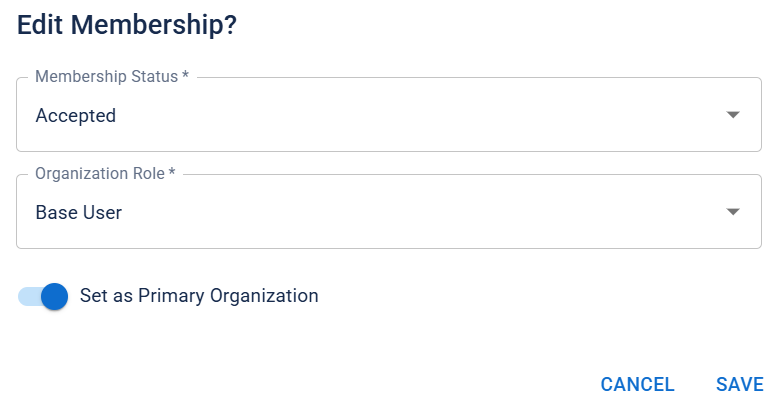
You can now set your primary organization in the Accounts page (Organizations tab). You can only have one primary organization at a time. When an organization has been set as primary, it displays a primary label in the organization list. For more information, refer to the Edit Account Information page.
Resolutions
-
Resolved an issue where account badges did not print to PDF as intended.
-
Resolved an issue where the Profile page did not detect the inclusion of the Social Security Number, even after it had been added and saved.
-
Resolved an issue where running a bulk action on multiple accounts with different background check statuses presented an error instead of running the bulk action on only the accounts with a clear background check status.
-
Resolved an issue where the missions were not displaying correctly for qualified volunteers
A user who can participate in missions, request shifts, and record volunteer hours.. -
Resolved an issue where updating the background check consent settings modified the background check status.
Previous Versions
Release notes from previous versions are available here.