CORES RMS 6.8 Release Notes
These notes describe updates in the CORES RMS 6.8 release, scheduled for February 12, 2026. More information is available through the help in your solution or by contacting The internal and external people that participate in, might be affected by, or need to be notified about an incident. the Juvare Support Center at +1 (877) 771-0911 or support@juvare.com.
Browser compatibility
-
Latest Microsoft Edge Version
-
Latest Google Chrome Version
New Features
Mission Archiving
Missions can now be archived, which allows you to archive closed missions and move them from your Active Missions tab to the Archived Missions tab. Missions can only be archived if they do not have any active or scheduled shifts, pending volunteers A user who can participate in missions, request shifts, and record volunteer hours., or pending hours in the mission roster. When a mission is archived, it cannot be restored or edited; the mission is permanently disabled, and only appears in the Archived Missions tab.
An archived mission can also be deleted entirely so that the data can also no longer be viewed.
For more information on archiving or deleting missions, refer to the Manage Missions page.
New Account Filters
There are several new account Used to track and manage users. Accounts differ from your profile, which is used to modify personal settings for using the solution. filters in the All Filters pane, Account Information drop-down, which give the ability to filter accounts that may have Email Issues or Contact Issues. You can also filter by Contact Methods and narrow results according to system role Permissions assigned to accounts. Your role determines what you can view, modify, and manage in the application. and account status Works with roles and permissions to determine the features you can access..
These filters allow you to search for, review, and fix issues related to invalid email addresses, email addresses that have unsubscribed from notifications An alert, update, advisory, information, drill, or test message that can be sent & received through delivery methods such as email, voice, text, fax, or inbox. or marked notifications as spam, and accounts with unavailable text consent.
For more information about account filters, refer to Filter Accounts and All Filters Reference.
International and Military Address Support
Account and personal information forms have been updated to support multiple address types, including international and military addresses. These addresses can also be imported to and exported from CORES RMS. This support has been added anywhere that addresses can be searched in the application.
For more information about address support, refer to Edit Account Information.
If you are interested in enabling this support, contact your Client Success Manager (CSM).
Enhancements
Expanded Mission Capabilities
The existing capabilities for missions have been expanded and improved on by implementing: mission mobilization notification selection and daily mission scheduling.
When mobilizing a mission, a dialog now opens to allow you to enable or disable the mobilization notification. If you leave it enabled, all qualified volunteers are notified when the mission is mobilized. If you disable the notifications, mobilizing the mission does not notify any volunteers, whether or not they are qualified.
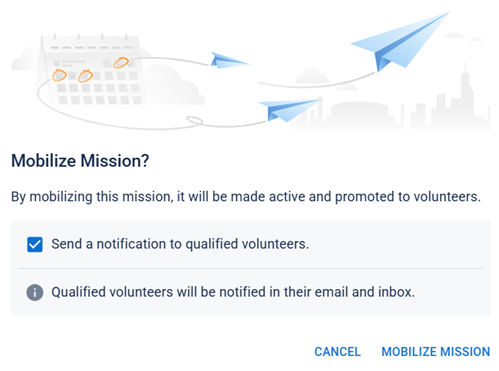
When scheduling mission shifts A scheduled period during which users perform work for a mission., you can set the date and hour using the Hourly option, as before, or you can select the Daily option to set a mission shift in a duration of days or as an open-ended mission shift.
For more information about mission mobilization, refer to Launch a New Mission, and for more information about mission shifts refer to Add a Shift to a Mission.
Expanded Shift Capabilities
When managing active missions, there are now a few things you can do with the mission shifts, depending on whether or not the shift has already been activated. If the shift has been added, you can now end active shifts or cancel upcoming shifts. If the shift hasn't been added yet and is still editable, you can delete drafts so that it never becomes active.
-
Ending a shift is performed on currently active shifts, bringing it to a close before the scheduled shift day/time. It is moved to the Inactive Shift tab.
-
Canceling a shift is performed for upcoming shifts that have not yet started.
-
Deleting a draft shift removes the shift from the list entirely.
Any time a shift is ended or canceled, notifications are sent to all volunteers in the shift roster to notify them of the changes.
For more information about ending, canceling, or deleting shifts, refer to Manage Shifts.
Account Filter Improvements
The following improvements have been made to the Account filters in the All Filters pane:
-
It is now possible to filter accounts by any or all filters in the Trainings, Skills, & Certificates and Group Memberships drop-downs.
-
You can search for volunteers by Badge number.
-
All filters now display in a collapsed view to make it easier to see a more complete list.
For more information about account filters, refer to Filter Accounts and All Filters Reference.
Training Certificate Upload Notifications
Whenever a user uploads a training An external learning system used to manage training records and course completions. certification file to their profile A collection of information that identifies and defines you in the solution. Your profile differs from your account, which is how you log in., a notification is sent to the organization Official entities, such as public health authorities, healthcare agencies, and corporations. administrator. If you do not want CORES RMS to send these notifications, system administrators can disable them in system notifications.
Permission Updates
Organization administrator permissions have been expanded so that they can modify pending account profile pictures and run background checks against pending members.
Resolutions
-
Resolved an issue where badge
A printable ID that displays user information, such as name, occupation, and credentials. expiration dates were not updated in the badge preview when the expiration dates were amended. -
Resolved an issue where a user was removed from all pending organizations if they withdrew from a pending organization when they had more than one pending membership.
-
Resolved an issue where verifications were shown as "processing" even when they were in other statuses.
-
Resolved an issue where location filters sometimes did not behave as expected.
-
Resolved an issue where requirements for phone number and occupation were bypassed during registration.
-
Resolved an issue where notifications sent when promoting shifts listed a county multiple times.
-
Resolved an issue where the background checks and credential verifications were not displayed when a volunteer's profile was opened from within an organization or group
Comprised of accounts with certain shared characteristics, such as role or location, but not necesarily employer.. -
Resolved an issue where background checks did not show as "Complete: Clear" when they were in that status.
-
Resolved an issue where organizations were not shown in alphabetical order.
-
Resolved an issue where organization administrators could not add accounts to a badge if the administrator was a regular user.
-
Resolved an issue where organization administrators could not add a user to the organization in the Add Accounts section when doing so through the badge workflow.
-
Resolved an issue where organization administrators were able to view the organization status
Indicates an account's standing within an organization. of non-accepted volunteers. -
Resolved an issue where the status of mobilized missions was not updated when shifts were completed, and the status could not be manually updated to "closed".
-
Resolved an issue where profile completion warnings were still displayed even after the user completed all relevant sections.
-
Resolved an issue where local administrators were able to manage members for organizations they did not have the rights to manage.
-
Resolved an issue where printing account badges to PDF sometimes resulted in an error.
-
Resolved an issue where Juvare Login Services did not fully log out the user.
Previous Versions
Release notes from previous versions are available here.