Add a Facility
Facilities are generally commercial or institutional premises, such as office buildings, schools, hospitals, laboratories, or government institutions that host people, systems, and data.
Facility management is an organizational function that manages and monitors an organization's physical locations, infrastructure, and operational sites.
To add a facility
-
On the main menu, click
 Facilities. The Facilities page opens.
 -
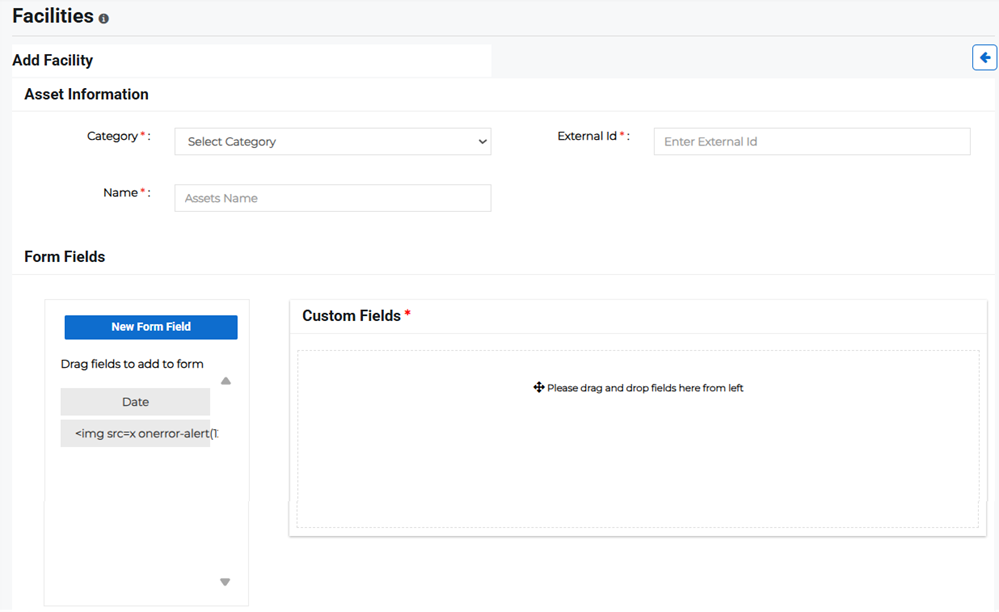
Click Add Facility in the upper right. The Add Facility page opens.
-
Enter the Asset Information:
-
Category: Specify the facility category, such as factory or warehouse.
-
External ID: Enter a unique facility ID using either alpha or alpha-numeric strings.
Example The external ID for an office might be APAC_LAKEVIEW_TECH_PARK or for a warehouse might be TULIP_TOWER_2.
Please note that the External ID cannot be changed once the facility has been created.
-
Name: Enter the name of the facility.
-
-
Enter form fields for the facility by dragging and dropping them from the pane on the left to the Custom Fields box, or creating a New Form Field then entering it into Custom Fields.
-
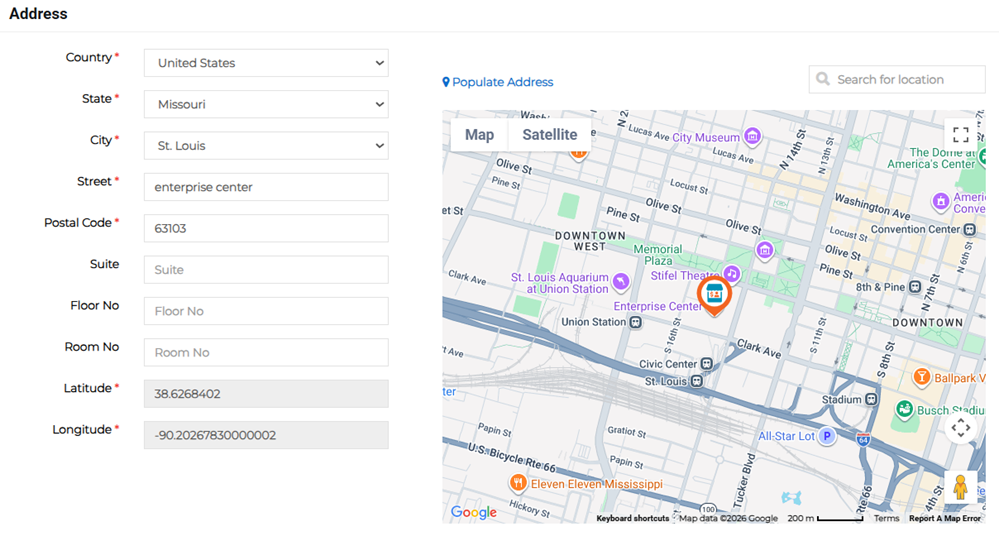
Enter the facility's address details. This is the full address, which populates the location on the map and the latitude and longitude fields.
-
Click Save.
Related Concepts
Related Tasks