Add Equipment
Equipment refers to machinery, tools, and devices that are significant for the ability, safety, quality standards, and business objectives of the organization.
Reducing the frequency and severity of critical equipment failures, downtime, or degradation helps ensure the organization isn't left vulnerable.
To add equipment
-
On the main menu, click
 Equipment. The Equipment page opens.
 -
Click Add Equipment in the upper right. The Add Equipment page opens.
-
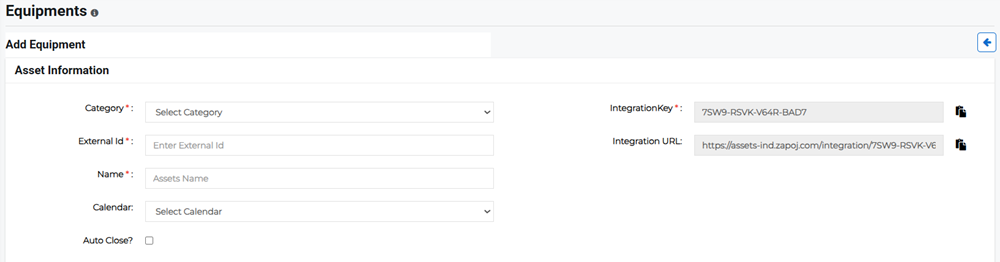
Enter the Asset Information:
-
Category: Specify the equipment category, such as Electrical & Power or Fire Safety.
-
External ID: Enter a unique equipment ID using either alpha or alpha-numeric strings.
Example The external ID for a generator might be IND_BLR_TGW.
Please note that the External ID cannot be changed once the equipment has been created.
-
Name: Enter the name of the equipment.
-
Calendar: Select the appropriate staff calendar on which this equipment should appear.
-
Auto Close?: Enable this of you want incidents to close automatically after certain conditions are met instead of requiring you to close it manually.
-
Integration Key and Integration URL: IoT equipment uses embedded sensors to collect, exchange, and share data with other devices, applications, and systems in real-time. With the help of the integration key and URL this equipment can be integrated to share specific alerts or notifications.
Example IoT devices tagged with sensors are used for tracking real-time location of medical equipment, such as wheelchairs, defibrillators, nebulizers, oxygen pumps, and other monitoring equipment.
-
-
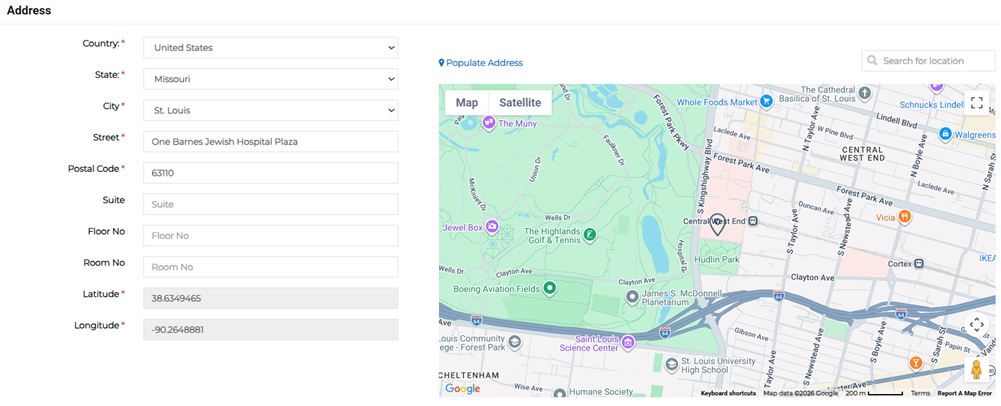
Enter the address where the equipment is located. At least one address is required. This is the full address, which populates the location on the map and the latitude and longitude fields.
-
Click Save.
Related Concepts
Related Tasks