Add a Supply Chain
Supply chain logistics coordinate the shipping of goods and services worldwide. Asset management enables the organization to trace the products accurately in different locations, bringing more efficiency to supply chain operations by enabling asset analysis.
To add a supply chain
-
On the main menu, click
 Supply Chain. The Supply Chain page opens.
 -
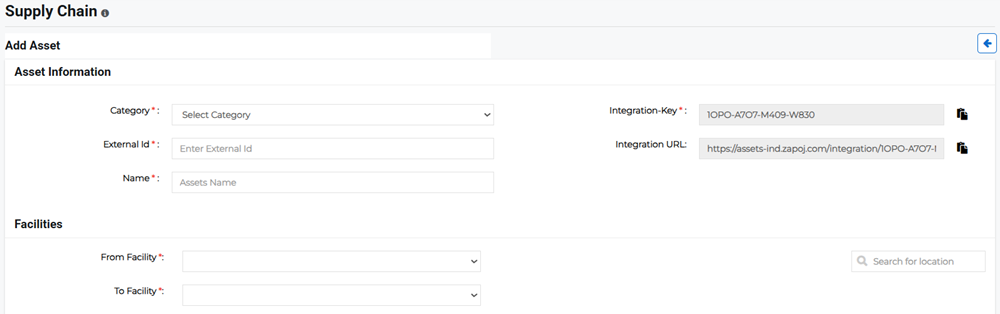
Click Add Supply Chain in the upper right. The Add Asset page opens.
-
Enter the Asset Information:
-
Category: Specify the supply chain category, such as Storage Facilities or Transport.
-
External ID: Enter a unique supply chain ID using either alpha or alpha-numeric strings. Supply chain traceability allows you to track products from source to consumer. It connects all the points in a supply chain together, keeping you in control of your goods and branding.
Please note that the External ID cannot be changed once the supply chain has been created.
-
Name: Enter the name of the supply chain.
-
Integration-Key and Integration URL: With an integration key and URL, supply chain logistics between the source facility and destination facility can be seamlessly tracked. Any potential threats en route will be alerted.
Example Delivery companies typically use GPS tracking to simplify their customer service workflow and track deliveries in real-time. With GPS tracking, there is no need to call the drivers and ask for their location in order to update the delivery status.
Example Satellite trackers successfully provide constant updates on the vehicle's location and can also be used by drivers to call for help when their cell phones are not in a service area.
-
-
Enter the Facilities information:
-
From Facility: Specify the asset's origination facility.
-
To Facility: Specify the asset's destination facility.
-
-
Click Save.
Related Concepts
Related Tasks